Smartphone Yellow Screen Issue Surges: Immediate Fixes for Android and iOS
 By Robert Thorne
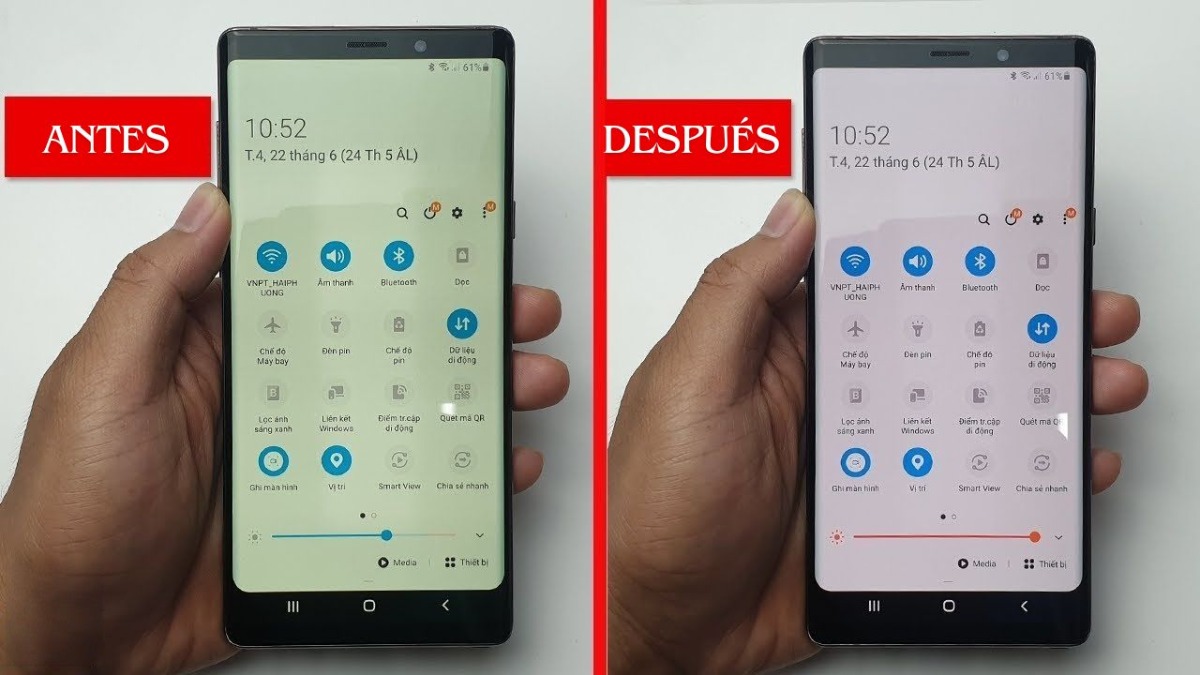
Modern mobile operating systems prioritize circadian health over strict color accuracy. Displays produce high-energy visible light, peaking around the 450-nanometer wavelength, which suppresses melatonin production and disrupts natural sleep cycles. To mitigate this biological friction, software engineers at Google, Apple, Samsung, and Xiaomi implemented automated color shifts that push panels toward warmer Kelvin ratings as evening approaches.
The problem arises when these features activate silently. A background OS update, a restored cloud backup, or an accidental tap inside the quick settings panel can toggle these profiles permanently. When calibrated properly, standard mobile panels sit between 6,500K and 6,700K (the international D65 standard for neutral white light). Once an aggressive blue light filter takes over, color temperature plunges toward 3,500K, 4,000K. Whites turn parchment yellow. Blues lose their punch. Contrast flattens entirely.
Beyond intentional eye-care modes, accessibility suites present another blind spot. Both iOS and Android host secondary color filtration tools designed for users with protanopia, deuteranopia, or severe light sensitivity. If an accessibility shortcut gets assigned to a power button triple-click, placing a phone into a pocket can inadvertently flip the entire operating system into an aggressive high-contrast amber overlay.
Robert Thorne covers electric vehicle innovations, autonomous driving systems, global mobility trends, and automotive engineering developments.
